Countdown with discount code
Countdown with Discount Code
Since v2.4.0Product page
The Countdown with Discount Code block displays a promotional banner on the product page combining a live countdown timer with a copyable discount code. It is ideal for creating urgency around time-limited offers and encouraging customers to apply a discount before it expires.
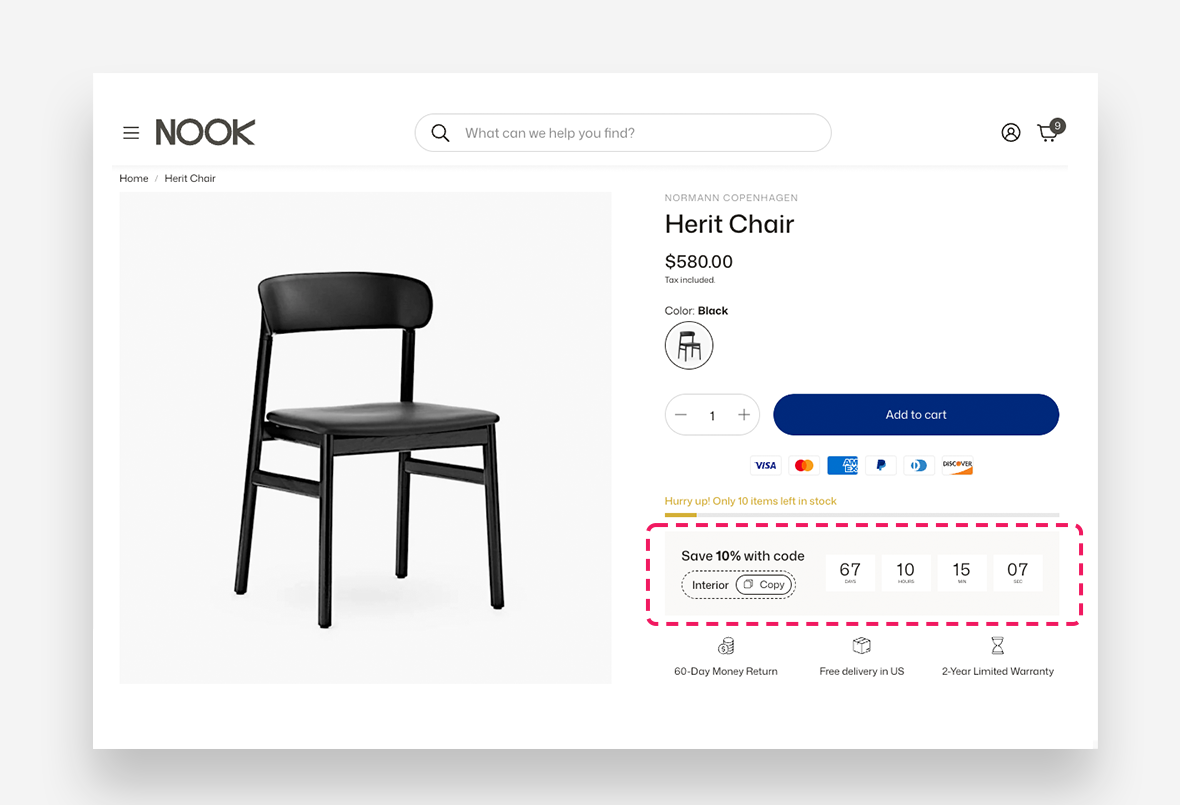
Settings
General Settings
- Heading — Enter the promotional message displayed above the discount code and timer. Rich text formatting options are available.
- Text style — Set the text style of the heading — Headline or Body.
- Heading scale large screen — Adjust the font size of the heading on large screens.
- Heading scale mobile — Adjust the font size of the heading on mobile devices.
- Discount code — Enter the discount code displayed and copied by the customer.
- Hide widget when discount code is empty — Enable this toggle to automatically hide the entire block when no discount code is entered.
Countdown
- End date and time — Set the date and time at which the countdown ends. Enter the value in the format
YYYY-MM-DD HH:MM. - Expired message — Enter the message displayed once the countdown has reached zero.
- Show labels below the timer — Enable this toggle to display labels such as Days, Hours, Min, and Sec beneath the timer digits.
- Style — Set the text style of the timer digits — Headline or Body.
Layout
- Countdown column width — Define the width of the countdown timer column relative to the block.
- Timer scale large screen — Adjust the font size of the countdown timer on large screens.
- Timer scale mobile — Adjust the font size of the countdown timer on mobile devices.
- Counter item width (desktop) — Define the width of each individual timer unit on desktop.
- Counter item width (mobile) — Define the width of each individual timer unit on mobile devices.
Section Colors
- Section background color — Customize the background color of the block.
- Text color — Define the text color within the block.
- Counter item background color — Set the background color of each individual timer unit.